Bring the Spooky Fun to Life with the Boogie Typeface
There is a specific moment in every designer's workflow—whether you are crafting a movie poster, planning a school event, or designing merchandise—where you need a font that screams personality. You don't want something generic; you want something with character, energy, and a specific vibe. Enter Boogie, a premium font that captures the playful, spooky essence of the Halloween season with a distinct, colorful flair.
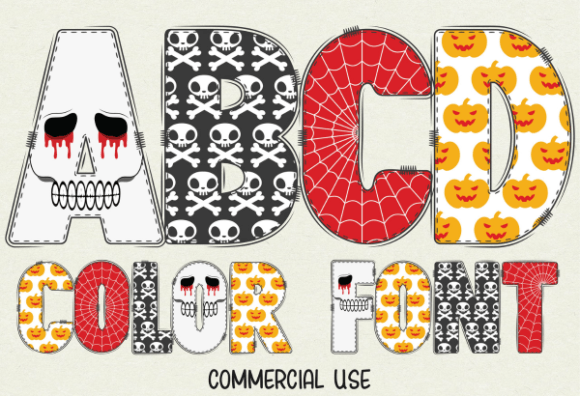
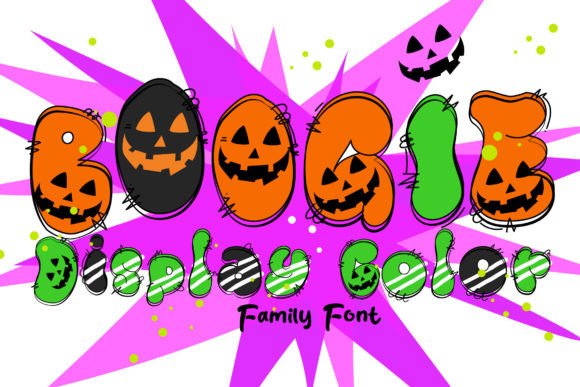
At first glance, Boogie isn't just a typeface; it's a visual event. It functions as a detailed, colored display font that mimics the aesthetic of Halloween novelty typography. Think of the classic lettering you see on trick-or-treat bags, haunted house flyers, or animated movie titles. The letters are crafted with depth and shading, often looking as though they are inflated or wrapped in textured materials. It has a cartoonish, retro vibe that feels nostalgic yet entirely capable of looking modern in the right context. Because it is designed as a colored font, the glyphs come pre-shaded and textured, meaning you get a multi-dimensional look without needing advanced Photoshop skills to add bevels and shadows manually.
Understanding the Two Sides of Boogie: Color vs. Cutter Compatibility
One of the most critical aspects of working with Boogie is understanding how its file formats function, as this dictates where and how you can use the design. In the world of modern typography, colored fonts are powerful, but they operate differently than standard text.
The color version of Boogie is a specialized creative font designed for robust graphic design software. If you are working in Adobe Photoshop, Adobe Illustrator, Silhouette Studio, or Inkscape, you can utilize the full, vibrant potential of this typeface. These programs support the SVG (Scalable Vector Graphics) data embedded within the font file, allowing the letters to retain their intricate color gradients, textures, and shading. This makes the color version the ideal choice for high-impact social media graphics, digital web design elements, and complex editorial design layouts where visual flair is the priority.
However, if your project involves physical cutting machines—such as a Cricut—you need to pivot to the black version. The monochromatic version of Boogie is fully compatible with Cricut Design Space and similar hardware. While you lose the pre-loaded colors, you retain the fun, spooky shape of the letters. This is perfect for vinyl decals, heat transfers for t-shirts, or paper crafting where you might want to use your own specific color palette of vinyl or cardstock. It is a practical distinction that separates a hobbyist approach from a professional design workflow, so always evaluate your end-product requirements before selecting your file.
Where to Use Boogie for Maximum Impact
Because Boogie is a display font with a very specific "personality," it isn't meant for body copy. You wouldn't use it to write a paragraph of text in a novel. Instead, its strength lies in headlines, logos, and standalone graphics where readability at a glance is paramount.
For small business owners and entrepreneurs, particularly those in seasonal markets, this font is a goldmine. Imagine a bakery creating flyers for October specials; Boogie instantly sets a festive mood. For packaging design, specifically for candy or party supplies, the font's inherent playfulness communicates the product's nature before the customer even reads the words.
It also shines in logo design for seasonal events or specific brands that cater to a younger demographic or the gothic/spooky niche. If you are a content creator or a blogger, using Boogie for YouTube thumbnails or Pinterest pins regarding horror movie reviews or Halloween DIY projects can significantly increase click-through rates. The visual hierarchy is clear: the font demands attention, making it perfect for the "Hero" section of a poster or the cover of a book or movie.
Practical Application: Pairing and Professionalism
When integrating a heavy, textured display font like Boogie into a broader brand identity, balance is key. Because the font is so visually loud, it requires a "quiet" partner. A clean sans serif font or a simple serif font works best for accompanying text. If you pair Boogie with a script font or another handwritten font, the result can become cluttered and difficult to scan, which hurts engagement.
Consider the visual hierarchy of your design. Boogie should be the focal point—the headline that draws the eye in. Once you have the viewer's attention, a legible, standard typeface should take over to deliver the details, such as dates, times, locations, or product descriptions. This approach ensures your design looks professional rather than chaotic.
Furthermore, readability is a major factor in modern typography. While Boogie is legible at large sizes, you should avoid using it for small sub-headers or lengthy captions. The detailed nature of the font can get lost or become muddy at smaller point sizes, especially in print. Always test your designs by printing a draft or viewing them on a mobile device to ensure the "spooky" charm doesn't compromise the message.
A Versatile Asset for Seasonal and Niche Projects
Ultimately, Boogie is a specialized tool in a designer's toolkit. It is a commercial font that offers a distinct aesthetic that generic system fonts simply cannot replicate. Whether you are a crafter making decorations for a neighborhood party or a marketer designing a campaign for a horror film festival, this typeface provides the visual shorthand for "fun, spooky, and exciting."
By respecting its limitations—knowing when to use the color SVG version versus the black cutter version—and pairing it intelligently with more subdued typefaces, you can leverage Boogie to create designs that are not only visually striking but also effective communication tools. It proves that design assets don't just have to be functional; they can be fun, too.