Coconut: The Playful Display Font for Creative Brands
There is a specific moment in the design process where you need to inject personality without sacrificing clarity. You are working on a logo for a boutique bakery, a header for a children’s activity guide, or perhaps the cover for a light-hearted podcast, and the standard sans serif font feels too cold. This is exactly where Coconut enters the conversation. It is a premium font designed not just to be read, but to be felt. It bridges the gap between the organic warmth of a handwritten font and the structured legibility required for professional branding.
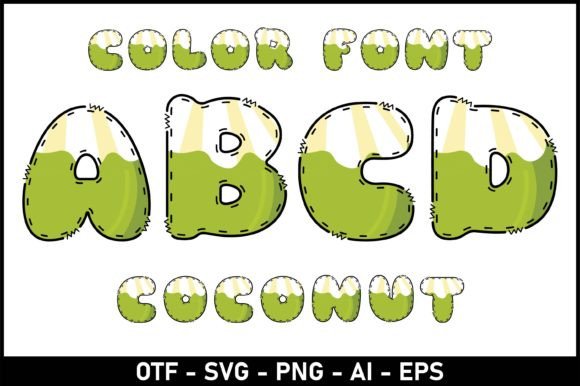
Visually, Coconut strikes a balance that many typefaces struggle to achieve. It carries the fluidity of a script font but avoids the illegibility often associated with cursive. The letterforms feature soft, rounded terminals and a slight bounce in the baseline, giving the text a rhythmic, happy cadence. It feels hand-lettered and authentic, yet it possesses the consistency of a high-quality typeface. For designers and entrepreneurs, this means you get that "human touch" without the chaos of actual handwriting. It is a creative font that feels approachable and optimistic, making it an ideal tool for projects that need to connect with an audience on an emotional level.
The Art of Visual Hierarchy: Where Coconut Shines
Understanding when to deploy a font like Coconut is just as important as liking how it looks. As a display font, it is engineered for impact. You would not use it for body copy in a legal document, but you absolutely should use it where you need to grab attention immediately. In logo design, Coconut can define a brand’s voice instantly. It tells the customer that a brand is friendly, creative, and perhaps a bit playful. For instance, if you are building a brand identity for a lifestyle blog or a children’s boutique, this font sets the tone before the customer even reads the tagline.
Its utility extends heavily into packaging design and editorial design. Imagine a line of organic skincare products; Coconut provides the natural, earthy aesthetic that suggests hand-crafted quality. In publishing, specifically in children’s books, it is invaluable. As noted in the creative community, fonts used for young audiences need to be whimsical and engaging. Coconut fits this niche perfectly, creating an immersive reading experience that feels like a story being told aloud rather than just words on a page.
Furthermore, do not overlook its power in the digital space. For social media graphics, attention spans are short. A bold, textured header in Coconut can stop the scroll. It adds personality to Instagram stories, Pinterest pins, and Facebook headers. In web design, it serves as a fantastic accent font for call-to-action buttons or hero section headlines, adding a layer of warmth to an otherwise grid-based layout.
Strategic Pairing and Typography Mechanics
A font rarely works in isolation. To get the most out of Coconut, you need to master the art of font pairing. Because Coconut has such a strong personality—leaning toward the artistic and informal—it requires a grounding partner. A common mistake is pairing it with another decorative font, which results in visual clutter.
Instead, look for a sturdy, clean serif font or a geometric sans serif font to act as the supporting cast. The contrast is key. If Coconut is the loud, charismatic host of the party, your secondary font is the reliable friend holding the clipboard. For example, pairing Coconut with a clean sans serif for your sub-headers and body text creates a hierarchy that is easy for the eye to navigate. The display font handles the "emotion," while the secondary font handles the "information."
Legibility is another crucial factor. While Coconut is a modern typography asset, you must test it across different mediums. It performs exceptionally well on high-resolution screens and quality print stock. However, be mindful of scale. If you shrink it down too small for a footer note on a busy background, the delicate details of the script font style might get lost. Always print a test sheet or view it on a mobile device to ensure the kerning and spacing hold up.
From Hobbyist Projects to Commercial Licensing
For the hobbyist or crafter, Coconut is a joy to work with. It elevates DIY projects like greeting cards, wedding invitations, and scrapbooking. It adds a professional polish to homemade goods that standard system fonts simply cannot provide. However, if you are a business owner, the technical specifications matter just as much as the aesthetic.
Before integrating Coconut into your brand identity, verify the scope of the license. Most premium fonts come with specific usage rights. A standard license usually covers desktop usage (logos, print), but if you plan to use it for a high-traffic website (embedding via CSS) or for print-on-demand merchandise (t-shirts, mugs), you may need an extended commercial license.
Check the file formats included in the package. Ideally, you want OTF (OpenType) or TTF (TrueType) files for desktop installation, and WOFF or WOFF2 files for web design. Some versions of creative fonts also include PUA (Private Use Areas) encoded characters, which allows you to access special swashes and ligatures even without professional design software like Adobe Illustrator.
Final Thoughts on Application
Ultimately, Coconut is more than just a set of letters; it is a design asset that facilitates connection. Whether you are a marketer trying to soften a brand’s image, a publisher looking for the perfect title treatment, or a small business owner designing your first menu, this typeface offers a solution that is both beautiful and functional.
When you choose a font like Coconut, you are choosing to prioritize warmth and personality. It works best when you let it breathe—give it space on the page, contrast it with clean lines, and use it to highlight the most important parts of your message. By respecting its style and utilizing it within the right context, you can transform a standard project into something that feels truly bespoke and memorable.